Drlogy
Healthcare organization
Why Report Format Feature Must For Diagnostic Lab Software
Effective report formatting in diagnostic lab software is essential for clear communication of test results, ensuring both patients and healthcare providers can easily interpret data.
Check
By offering customizable, secure, and visually engaging report formats, labs can enhance accuracy, efficiency, and patient satisfaction.
10 Best Report Format Features For Diagnostic Lab Software
Here are 10 Best Report Format features For Diagnostic Lab Software.
1. Customizable Report Templates
- Allows labs to create personalized templates that suit their specific testing procedures and preferences.
- Supports different layouts, including single or multi-page formats, to present data effectively.
- Enables the inclusion of logos, headers, and footers to reflect the lab’s branding.
- Offers flexibility to modify templates for different departments or test types.
- Ensures uniformity in reports, maintaining consistency across all lab results.
2. Clear Data Visualization
- Integrates charts, graphs, and tables for easy interpretation of complex lab results.
- Utilizes color-coded systems to highlight normal and abnormal ranges.
- Provides options for displaying historical data alongside current results for comparison.
- Improves patient and doctor understanding with visual aids that simplify information.
- Offers flexibility in choosing the type of visual representation for different types of reports.
3. Multi-Language Support
- Allows reports to be generated in variousuages to cater to diverse patient populations.
- Provides automatic translation features to ensure clarity acrossuage barriers.
- Helps patients and healthcare providers understand test results in their preferreduage.
- Supports the inclusion of detailed explanations of test findings in multipleuages.
- Increases accessibility and patient satisfaction by offeringuage options.
4. Integrated Reference Ranges
- Automatically includes reference ranges for different tests, based on age, gender, and medical history.
- Ensures that each report clearly defines normal versus abnormal results for easy interpretation.
- Customizable to account for regional or lab-specific reference values.
- Offers flexibility in presenting reference ranges for individual tests or grouped tests.
- Enhances report accuracy and understanding by providing critical context alongside test results.
5. PDF and Digital Formats
- Allows reports to be exported in multiple formats, such as PDF, Word.
- Ensures compatibility with different healthcare management systems and patient portals.
- Enables secure, encrypted sharing of reports with patients or referring physicians.
- Supports environmentally friendly, paperless workflows by offering fully digital formats.
- Offers mobile-friendly report formats, allowing patients to view results on smartphones or tablets.
6. Auto-Summary for Patients
- Provides a simplified summary of the report for patients, focusing on key findings.
- Translates complex medical jargon into layman’s terms to improve patient comprehension.
- Includes recommendations or next steps based on the test results.
- Offers a clear, concise explanation of the results, reducing the need for follow-up questions.
- Enhances patient empowerment by helping them better understand their health status.
7. Batch Report Generation
- Enables the generation of multiple reports simultaneously for high-volume testing scenarios.
- Reduces the time spent manually creating individual reports for routine or bulk tests.
- Offers streamlined report generation for large-scale labs, improving efficiency.
- Supports grouping reports based on departments, physicians, or patient categories.
- Ensures that bulk reports maintain the same level of detail and accuracy as single reports.
8. Data Security and Encryption
- Ensures all reports are securely encrypted to protect patient information.
- Offers password-protected access to reports, ensuring only authorized personnel can view them.
- Complies with data protection regulations like HIPAA and GDPR for patient confidentiality.
- Includes audit trails to track who accessed or modified the reports.
- Prevents unauthorized sharing or tampering of sensitive health data through secure transmission.
9. Customizable Report Filters
- Allows users to filter and sort reports by test type, date, physician, or patient for quick access.
- Provides options for detailed or summary views depending on the user’s preference.
- Simplifies the retrieval of specific reports with advanced search functionality.
- Enhances efficiency by allowing staff to focus on relevant data without sifting through unnecessary information.
- Supports lab staff inentifying trends or specific details for further analysis.
10. Automated Report Delivery
- Automatically delivers reports to patients and healthcare providers via email or patient portals.
- Offers secure and scheduled report delivery, ensuring timely access to results.
- Supports integration with other systems for seamless report sharing between labs and clinics.
- Reduces administrative tasks by automating the distribution process.
- Improves patient satisfaction with real-time notifications when reports are ready.
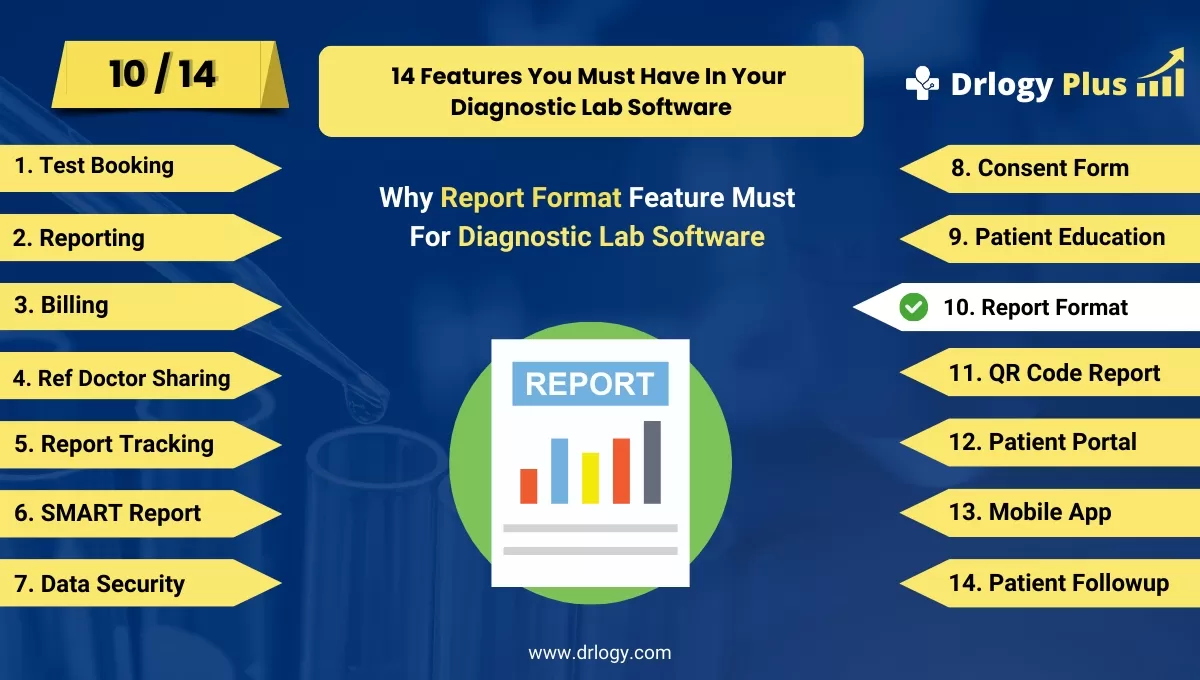
14 Steps Guide For Diagnostic Lab Software
Here are 14 Steps Guide For Diagnostic Lab Software.
| 1. Online Test Booking | 8. Consent Form |
| 2. Reporting | 9. Patient Education |
| 3. Billing | 10. Report Format |
| 4. Ref Doctor Sharing | 11. QR Code Report |
| 5. Report Tracking | 12. Patient Portal |
| 6. SMART Report | 13. Online Test Booking |
| 7. Data Security | 14. Patient Followup |
Summary
Overall, These report format features in diagnostic lab software streamline operations, enhance patient and provider understanding, and ensure secure and timely access to accurate, well-presented test results.
Also, Check our complete 14 steps Drlogy Diagnostic Lab Software Buying Guide guide to make an informed decision and streamline your diagnostic Lab growth and Lab management and growth.