Drlogy
Healthcare organization
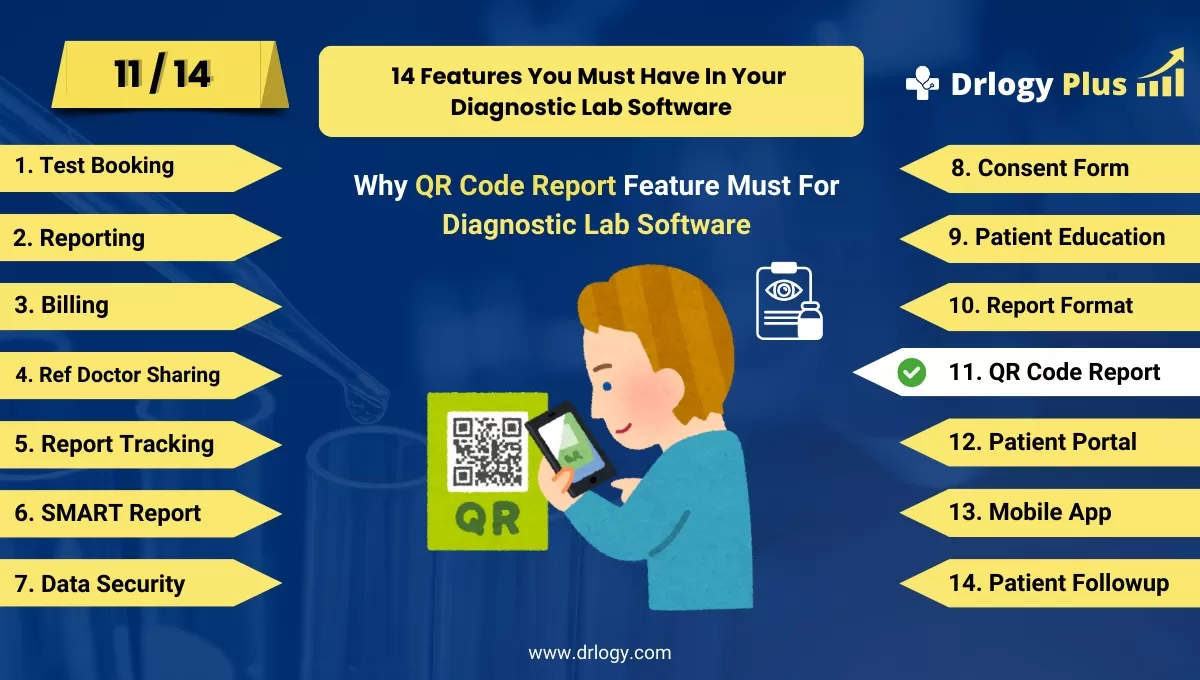
Why QR Code Reports Feature Must For Diagnostic Lab Software
QR code integration in diagnostic lab software provides patients and healthcare providers with instant, secure access to lab reports.
Check
This modern feature enhances convenience, streamlines communication, and supports a seamless, paperless workflow for efficient report sharing and management.
10 Best QR Code Reports Features For Diagnostic Lab Software
Here are 10 Best QR Code Reports features For Diagnostic Lab Software.
1. Instant Access to Reports
- Embeds QR codes on lab reports, allowing instant access to digital versions by scanning the code.
- Eliminates the need for paper reports, making it convenient for patients and healthcare providers.
- Ensures that reports can be accessed from any smartphone or mobile device.
- Provides quick access to test results without needing login credentials or additional steps.
- Enhances patient experience by offering an easy, tech-savvy way to retrieve their results.
2. Secure Report Access
- QR codes are encrypted and password-protected, ensuring only authorized individuals can access reports.
- Complies with data privacy regulations such as HIPAA and GDPR, safeguarding patient information.
- Tracks report access, creating an audit trail to monitor who views the reports.
- Prevents unauthorized sharing or misuse of sensitive health data through secure transmission.
- Increases patient trust by ensuring the confidentiality of their medical information.
3. Real-Time Report Updates
- QR codes link to dynamic reports that update in real-time as new results or changes are made.
- Ensures patients and healthcare providers always have access to the most up-to-date information.
- Eliminates the need to resend reports when updates are made, streamlining communication.
- Supports ongoing patient monitoring by providing instant access to evolving test results.
- Improves collaboration between labs, doctors, and patients through real-time information sharing.
4. Patient-Friendly Report Sharing
- Allows patients to easily share their QR code reports with family members or other healthcare providers.
- Provides a simple way for referring physicians to access results without manual transfer.
- Facilitates seamless sharing of health data in emergencies or follow-up appointments.
- Reduces the risk of report misplacement by offering a permanent digital copy via QR code.
- Enhances coordination between different healthcare teams through easy, secure report sharing.
5. Multi-Language Report Access
- QR code-linked reports are accessible in multipleuages, catering to diverse patient populations.
- Automatically provides the report in the patient’s preferreduage based on their device settings.
- Helps overcomeuage barriers, ensuring that all patients can easily interpret their results.
- Reduces the need for manual translation or additional paperwork for multi-language support.
- Improves patient satisfaction by offering personalized,uage-specific report access.
6. Integration with Patient Portals
- QR codes can be linkedectly to a patient's profile within lab or hospital portals.
- Offers a centralized hub where patients can access not only their reports but also medical history and appointments.
- Streamlines communication between labs, hospitals, and patients by integrating reports with patient records.
- Reduces the number of steps patients need to take to access their medical data.
- Enhances the overall patient experience with a seamless digital workflow.
7. Environmentally Friendly Reporting
- Reduces the need for printed reports by offering digital QR code-based access.
- Encourages sustainable practices by minimizing paper use in lab operations.
- Supports a fully digital workflow, contributing to an eco-friendly, paperless lab environment.
- Offers patients an easy way to store and retrieve their reports without physical copies.
- Helps labs lower operational costs by reducing printing and paper usage.
8. Mobile-Optimized Report Viewing
- Ensures QR code-linked reports are fully optimized for viewing on mobile devices and tablets.
- Provides a responsive design that adjusts the layout for easy reading on smaller screens.
- Increases accessibility for patients who prefer to manage their health on the go.
- Improves user experience by making reports visually clear and easy to navigate on mobile platforms.
- Reduces the need for patients to access desktop computers to view their lab results.
9. Appointment and Follow-Up Integration
- QR codes link patients not only to their reports but also to scheduling systems for follow-up appointments.
- Provides a one-stop solution where patients can review their results and book necessary consultations.
- Streamlines the process of managing healthcare appointments based on lab outcomes.
- Enhances patient convenience by combining report access with appointment scheduling.
- Reduces the likelihood of missed follow-ups by simplifying the patient’s next steps.
10. Customizable QR Code Reports
- Labs can customize the QR codes to include specific information, such as test type, patient, or date.
- Offers options for branded QR codes that reflect the lab’s name, logo, or contact information.
- Provides flexibility in how QR codes are displayed on reports, including placement and size.
- Enables labs to differentiate between different types of tests by using unique QR code formats.
- Enhances report organization and retrieval with clearlyentifiable, customizable QR codes.
14 Steps Guide For Diagnostic Lab Software
Here are 14 Steps Guide For Diagnostic Lab Software.
| 1. Online Test Booking | 8. Consent Form |
| 2. Reporting | 9. Patient Education |
| 3. Billing | 10. Report Format |
| 4. Ref Doctor Sharing | 11. QR Code Report |
| 5. Report Tracking | 12. Patient Portal |
| 6. SMART Report | 13. Online Test Booking |
| 7. Data Security | 14. Patient Followup |
Summary
Overall, Integrating QR code features into diagnostic lab software offers secure, instant, and patient-friendly access to reports, improving communication, efficiency, and the overall patient experience.
Also, Check our complete 14 steps Drlogy Diagnostic Lab Software Buying Guide guide to make an informed decision and streamline your diagnostic Lab growth and Lab management and growth.