Drlogy
Healthcare organization
Why Online Test Booking Feature Must For Diagnostic Lab Software
In today’s digital age, efficient online test booking features are crucial for diagnostic lab software, enhancing patient convenience and streamlining operations.
Check
These features not only improve user experience but also contribute to better patient outcomes and overall lab efficiency.
10 Best Online Test Booking Features For Diagnostic Lab Software
Here are 10 Best Online Test Booking features For Diagnostic Lab Software.
1. User-Friendly Interface
- A clean and intuitive interface allows users to navigate the booking system effortlessly.
- Simple design helps patients easily select tests and schedule appointments without confusion.
- Streamlined processes reduce booking time, improving overall user satisfaction.
- Visual cues and prompts guide users through the booking steps, minimizing errors.
- Accessible design ensures usability for all patients, including those with limited tech skills.
2. Comprehensive Test Catalog
- The software provides a complete list of available tests, enabling users to find what they need quickly.
- Descriptions and details for each test help patients understand the purpose and procedures involved.
- Users can filter tests by categories, such as type or urgency, to simplify their search.
- Regular updates ensure that the catalog reflects new and discontinued tests accurately.
- An easy-to-read format allows for quick comparisons between similar tests.
3. Real-Time Availability
- The system displays real-time slots, helping patients choose the most convenient times for appointments.
- Automatic updates on booking status prevent double bookings and scheduling conflicts.
- Users receive instant confirmation upon booking, ensuring peace of mind.
- An option for immediate rebooking if the desired time is unavailable enhances user experience.
- Real-time data helps staff manage lab resources effectively and reduce wait times.
4. Appointment Reminders
- Automated reminders via SMS or email reduce the likelihood of missed appointments.
- Customizable reminder settings allow patients to choose their preferred notification method.
- Reminders can include test preparation instructions, enhancing patient readiness.
- Follow-up notifications can be sent post-appointment to gather feedback or schedule future tests.
- Reminder features improve overall patient compliance and satisfaction with lab services.
5. Secure Patient Data Management
- The software ensures that all patient information is securely stored and encrypted.
- Compliance with regulations, such as HIPAA, protects patient confidentiality and builds trust.
- Patients can easily access and update their personal information through a secure portal.
- A secure system minimizes the risk of data breaches and unauthorized access.
- Clear privacy policies inform patients about how their data will be used and protected.
6. Online Payment Integration
- Patients can make secure online payments during the booking process, streamlining transactions.
- Multiple payment options, including credit cards and digital wallets, cater to diverse user preferences.
- Automated receipts are sent immediately after payment, simplifying record-keeping for patients.
- Clear pricing information helps patients understand costs upfront, preventing surprises.
- Integration with billing systems allows for efficient financial tracking and reporting.
7. Multi-Language Support
- The software offers support in multipleuages, making it accessible to a broader patient base.
- Patients can select their preferreduage for booking and communication, enhancing comfort.
- Multi-language options help reduce misunderstandings, ensuring accurate test bookings.
- The inclusive design fosters a welcoming environment for non-native speakers.
- Language preferences can be saved for future visits, improving user experience.
8. Test Preparation Instructions
- Detailed instructions are provided for each test, helping patients prepare adequately.
- Instructions can be accessed during the booking process, ensuring patients are well-informed.
- Clear guidelines reduce the chances of errors or delays due to improper preparation.
- The software can send reminders about specific preparation needs before the appointment.
- Enhanced preparedness leads to more accurate test results and improved patient outcomes.
9. Integration with EHR Systems
- Seamless integration with electronic health records (EHR) enhances data accuracy and accessibility.
- Healthcare providers can easily access patient histories during the booking process, ensuring informed decisions.
- Test results can be automatically uploaded to patient records, simplifying follow-up care.
- Integration reduces the risk of data entry errors by streamlining information transfer.
- A holistic view of patient data supports better diagnostics and personalized care.
10. Feedback and Rating System
- The software includes a feedback feature that allows patients to rate their booking experience.
- Patient reviews provide valuable insights for lab management to enhance services continually.
- Constructive feedback can be used to address specific issues and improve overall quality.
- A transparent rating system builds trust and encourages new patients to choose the lab.
- Positive reviews can be showcased, promoting the lab’s reputation and attracting more clients.
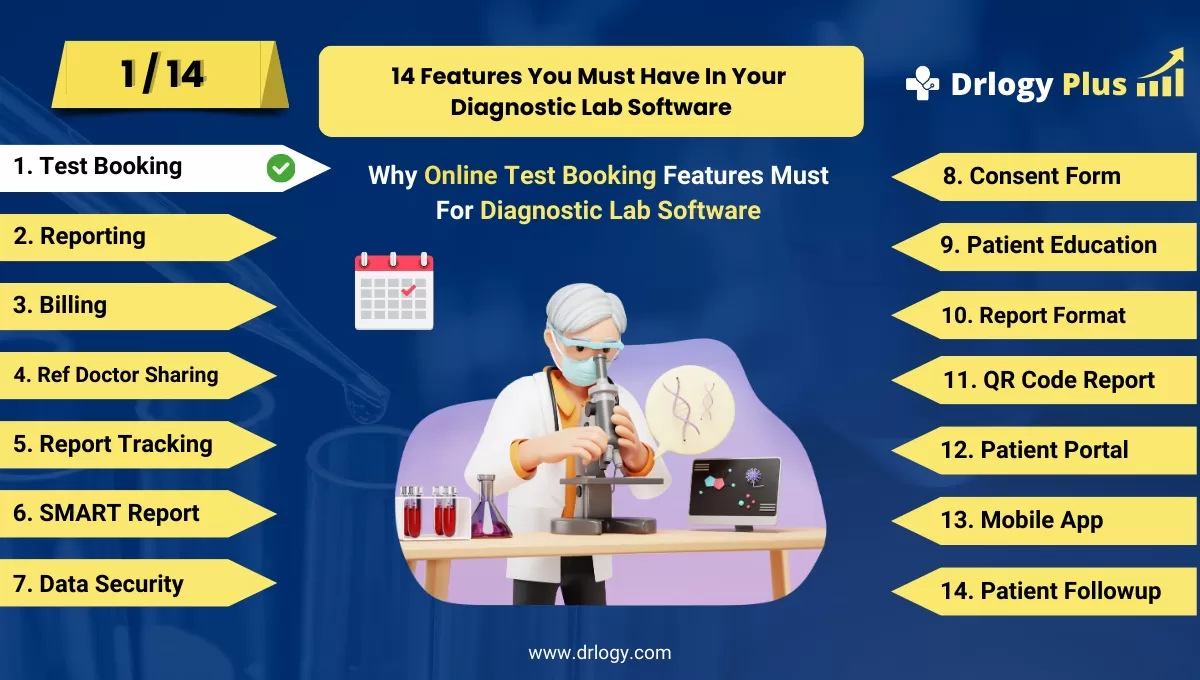
14 Steps Guide For Diagnostic Lab Software
Here are 14 Steps Guide For Diagnostic Lab Software.
| 1. Online Test Booking | 8. Consent Form |
| 2. Reporting | 9. Patient Education |
| 3. Billing | 10. Report Format |
| 4. Ref Doctor Sharing | 11. QR Code Report |
| 5. Report Tracking | 12. Patient Portal |
| 6. SMART Report | 13. Online Test Booking |
| 7. Data Security | 14. Patient Followup |
Summary
Overall, These features collectively enhance the efficiency, accessibility, and overall patient experience when booking tests online through diagnostic lab software.
Also, Check our complete 14 steps Drlogy Diagnostic Lab Software Buying Guide guide to make an informed decision and streamline your diagnostic Lab growth and Lab management and growth.